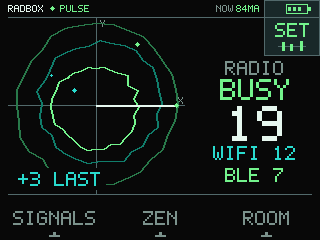
Pulse, redrawn
Static X and Y axes instead of a compass rose. No sweep line, no centre reticle. A white reference line follows the BMI270 as you turn the cube — it answers your hand, not a radio bearing.
Phones, watches, earbuds, TVs, routers, doorbells — most of what surrounds you is broadcasting all day, to nobody in particular. RADBOX turns that traffic into something you can actually watch, on a cube that fits in your hand: how busy the room is, what changed when you walked in, and whether it really goes quiet when you think it should.
Install it in a minute See what it shows
Pulse — signal weather. Nineteen results in the last scan: twelve Wi-Fi, seven BLE, three more than the scan before.
Filmed on the actual cube, not rendered. What you see on the screen is what the device draws.
Static X and Y axes instead of a compass rose. No sweep line, no centre reticle. A white reference line follows the BMI270 as you turn the cube — it answers your hand, not a radio bearing.
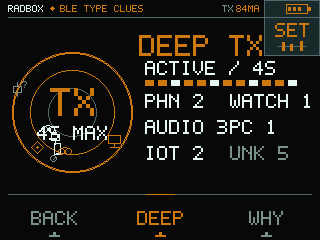
The one moment RADBOX transmits: standard BLE scan requests, four seconds at most, and only on an explicit tap. Then passive again, with a ten-second cooldown you can watch.
Public appearance values, service UUIDs, documented frame patterns and protocol clues — plus session-linking of rotating adverts across as many as 64 advertisers.
Bigger Settings and A/B/C targets, a 14 px / 500 ms tap, horizontal swipe between instruments, swipe down for Settings and up to come back.
When nothing is visible the circle breathes at a steady rate — and freezes completely when your system asks for reduced motion.
CHG, USB, LOW or BAT, or the instantaneous directional PMIC current in mA. No hour bands, no mAh, and no promise about how long it will last.
Every job gets its own screen instead of another tile in a menu. The limit under each one is part of the description, not the small print.
How many Wi-Fi and BLE results the last scan found, and how that number moved against the one before it.
An aggregate. Not devices, not positions.Where the visible access points sit across channels 1–13, scaled to whichever channel carries the most of them.
Not airtime. Not interference. Not a spectrum analyser.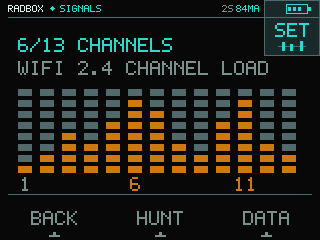
Follow one temporary session alias and watch its signal strength move. CLOSER and FARTHER describe strength, never distance or direction.
An explicit session. Optional clicks. No bearing.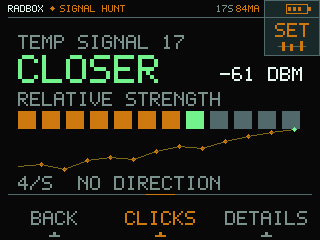
Keep one of at most four scene records on the cube. WHY gives a full screen to what the card is and where it stops.
No names. No MAC or BSSID. No export in this build.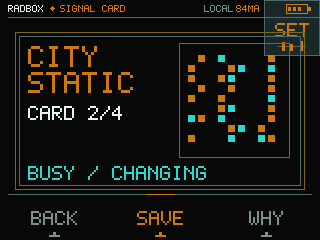
Take three scans for a baseline, walk the room, take three more. The difference is a reason to look closer.
Change in visible Wi-Fi and BLE. Not a camera detector.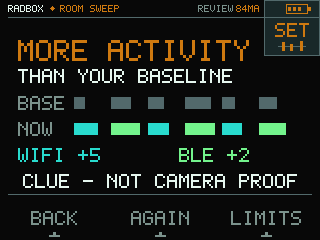
Groups visible BLE signals into broad, confidence-labelled type clues — phone, watch, audio, computer, IoT, unknown.
A mix, not a map. Passive by default; Deep only on an explicit tap.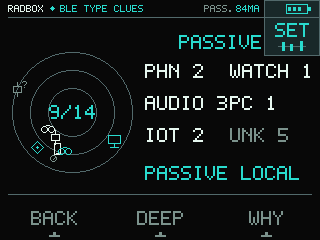
The last count becomes a calmer scene. Zero gives you ZEN, and proves nothing about silence, health or safety.
Swipe will not leave it. Back, Settings or power off.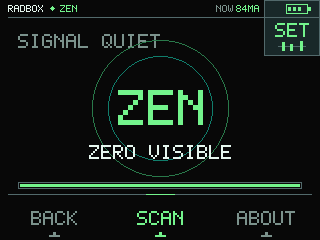
Five steps of brightness and volume, interface sounds, Zen audio, vibration, bounded motion, English or Polish. Stored on the cube.
Battery in four segments in the top bar, with a state label beside it.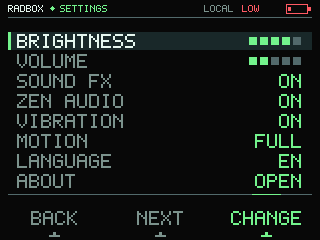
The QR code points back at this page. RADBOX and the Core2 Foundation work are Apache-2.0; the separate screen-capture tool stays GPL-3.0-only.
Dependencies keep their own licences. No account, no cloud.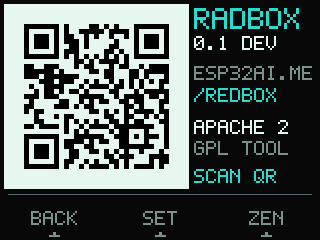
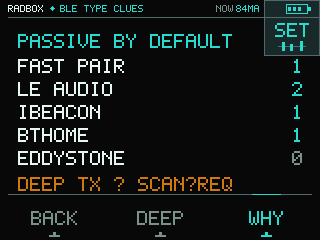
RADBOX groups visible BLE signals into broad, confidence-labelled type clues. Six classes, a confidence level on every single one, and Unknown whenever the evidence simply is not there.
Phone, Watch, Audio, Computer, IoT — and Unknown, which is a valid result rather than a failure to try harder.
Public Appearance values, service UUIDs, documented frame patterns and protocol clues like Fast Pair, LE Audio, iBeacon, BTHome and Eddystone. All of it public, all of it written down.
Strong, Likely or Hint. Nothing arrives as a bare fact, because a class without a confidence level reads like one.
Normal scanning listens and transmits nothing. Press DEEP and the cube sends standard BLE scan requests for at most four seconds, then drops back to listening and shows a ten-second cooldown. It never connects, never pairs, never bonds and never opens GATT.
Signal strength places a mark on one of the rings and means relative strength. It never decides the type and never a position.
What it never givesNo exact model, no owner, no MAC, no device name, no camera verdict and no location. None of that is read, inferred or kept.
Unknown is a valid result.In a real room the passive scan typed 0 of 14 and Deep typed 0 of 16 — with eleven manufacturer fields and five service fields present. Both the scanner and Deep worked exactly as built. Those adverts simply did not carry type evidence that qualifies under the current rules, so the honest answer was Unknown. This is what that looks like, and we would rather show it than a demo room picked to flatter the instrument.
Counts of visible 2.4 GHz Wi-Fi access points, how they spread across channels 1–13, visible BLE advertisers, and the relative strength of one session alias.
A device type, a person, a camera or a bug. It is blind to cables, to sleeping devices, to 5 GHz-only devices, to cellular networks and to the rest of the spectrum.
Your settings and at most four scene records. No names, no MAC or BSSID, no location, no account, no analytics, no cloud.
RADBOX shows change in the visible Wi-Fi and BLE layer.It can begin a room check. It does not replace a physical inspection or a specialist detector, and it never claims to have finished the job for you.
The BMI270 shifts the Pulse field by at most four pixels, and turning the cube changes the phase of its sweep. That is a response to your hand — not a compass, and not an RF bearing.
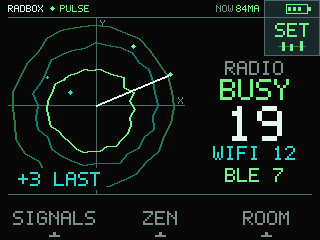
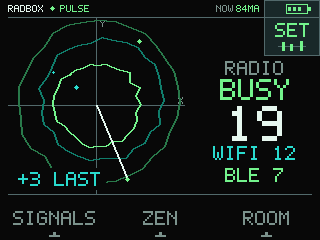
The marks are a bounded picture of an aggregate, not device positions. Proven on the host build; how it feels in the hand still waits for a verdict.
Not a launcher, not an app store, not a generic pentest bundle. One device tuned to the exact Core2 v1.3 — the same cube Open Radio runs on.
Paid partnership · M5Stack pays me a commission when you buy through my link; Botland gives me devices to test.
Nothing here has a date, and everything unbuilt carries the same label. It is published so you can see the direction, not so you can hold us to a calendar.
The RADBOX firmware was written by GPT-5.6-Sol running at its highest reasoning setting. Getting from an empty repository to this build took roughly 400 million tokens. What the agent did not decide: the limits of the hardware, the wording of every warning the device shows, and whether any of this goes out at all. Those belong to Tomasz Fiedoruk, and so does the answer for them.
This build is flashed and digest-verified on the exact Core2 v1.3, and the owner has authorised distributing it. Three things are still open, so you should hear them before you install: the hand tests and the soak on the device are unfinished, the runtime band is modelled rather than measured, and RADBOX is a working name that has not been cleared. There is no public repository.