How to play
Tap a game's cover on Tab5, then ▶. The game sits in the middle of the screen, not stretched; big buttons sit on both sides. Tap the scene to walk or pick something: it works like a mouse click.

- L CLICK
- Left mouse button: clicks where the pointer is. Handy after you've pointed with POINTER ON.
- R CLICK
- Right mouse button. In Beneath a Steel Sky it uses an object; other games may use it differently.
- POINTER
- ON: move the pointer without clicking, then press L CLICK or R CLICK. OFF: tapping the scene clicks again.
- QUICK
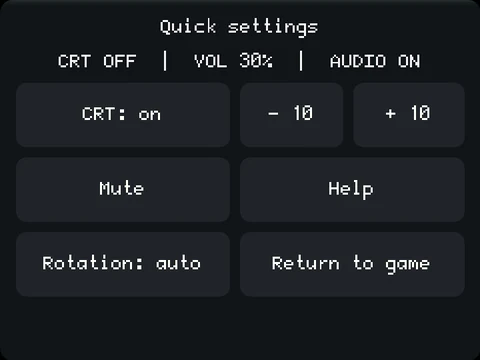
- Opens quick settings during the game: volume in steps of 10, mute, CRT mode, rotation lock and help with the controls in English or Polish. “Return to game” closes it.
- MENU
- Save stores your progress, Load brings it back, Resume returns to the game. Return to Launcher opens the game list.
- SKIP
- Works like the Esc key: skips an intro or closes some game screens. The game decides what can be skipped.
- KEYS
- Opens the on-screen keyboard. In a menu, a two-finger tap opens it too.
Saving
Save when a cut scene or a conversation has ended: MENU → Save → an empty slot → Save. The suggested name is fine. Wait until the game is back before you unplug. Nippon Safes saves differently: KEYS → s → ✓, then an empty slot.
Sound
The − / + buttons under VOLUME on the left change the volume. MUTE on the right switches the sound off and on; below it you see AUDIO ON and the volume. While muted, “+” changes the level without turning the sound on. Tab5 remembers these settings. If only one game is silent, open that game's settings (the gear icon) → Volume and make sure Mute all is unticked. QUICK has −10 / +10 and Mute too.
Turning the tablet
Tab5 works in either landscape position, right way up or upside down. Turn it around and hold it still for about a second: the game and menus rotate to stay upright, and taps still land where you touch. With a finger on the screen, or the tablet lying flat, the picture stays put. In QUICK, switch “Rotation: auto” to “Rotation: locked”; the lock survives a restart.
CRT mode (beta)
The “CRT: on” button in QUICK adds thin horizontal lines and a faint grid that follow the brightness of the scene. CRT mode is off by default and may make games less smooth: in three test runs it added about 23–47 ms of graphics work per frame, which misses our performance target. In some games QUICK shows “CRT unavailable”. Treat the mode as an experiment.
Looks
The sidebars are black by default. Settings → GUI → Theme changes the menus (Tab5 Light, Tab5 Dark or Tab5 Black); Settings → Tab5 → Sidebars changes their colour (Dark blue, Light, Black or Follow menu skin). You can pair a dark menu with light sidebars. See the look picker on Tab5.
Your profile
On the game screen, open Profile to see your active play time, favourite worlds and points. “Back to games” returns to the list. Points reward trying new titles; they don't say how far into a story you are.
Tips for individual games
Beneath a Steel Sky
To use an object, turn POINTER on, point at it, then tap R CLICK. Your items are along the top edge of the scene.
Flight of the Amazon Queen
Choose an action in the game's bottom panel, then an object or a person. SKIP moves through intro scenes that can be skipped.
The Curse of Monkey Island
To talk, use KEYS → t → ✓. Holding your finger on the scene shows the action wheel, but choosing from it by gesture is still being tested.
Sołtys
Walk up close to an object, then use POINTER → the object → R CLICK. The Polish message about distance means the hero is too far away.
Dráscula
Turn POINTER on. Point at WALK at the top → L CLICK, then at a place in the scene → L CLICK. Do the same for LOOK, TAKE and TALK, so you don't pick the wrong action by accident.
Nippon Safes, Inc.
- Start: choose JAPANESE / ENGLISH, then the closed new-game book, then R CLICK.
- Playing as Dino, press the tiles NE, RI, HO, WA, I, KI (6, 4, 7, 2, 5, 8, counting from the bottom left). Tap the text to move the opening conversation on.
- Save: KEYS → s → the green ✓, then an empty slot.
- Load during play: KEYS → l → ✓. After a restart choose EN and the open SAVED GAME book.
- MENU → Save and loading from the game list don't work in this game.